

Savolture Technical Guide
Liste de compatibilité des batteries Deye : ce que cela signifie réellement (et ce qui fonctionne hors liste) | Savolture
Réponse rapide : Deye publie deux listes officielles de batteries approuvées : une pour ses onduleurs hybrides basse tension (classe 48 V) et une pour ses modèles haute tension ...
body.sv-lang-fr { line-height: 1.55; }
Réponse rapide : Deye publie deux listes officielles de batteries approuvées : une pour ses onduleurs hybrides basse tension (classe 48 V) et une pour ses modèles haute tension (160 – 800 V). Mais la liste répond à une question plus précise que la plupart des acheteurs ne le pensent : elle nomme les batteries que Deye a testées pour la communication en boucle fermée, et ce ne sont pas les seules batteries qui fonctionnent physiquement. Une batterie LFP 48 V qui ne figure pas sur la liste peut toujours s’associer à un hybride Deye LV – si elle parle un protocole CAN, l’onduleur reconnaît ou fonctionne en mode de suivi de tension avec les bons points de consigne. La vraie décision n’est pas « ma batterie est-elle sur la liste ? Il s’agit de « Laquelle des trois voies de couplage suis-je suivie, et que me coûte chacune en termes de précision, de protection et de garantie ? » Ce guide vous guide à travers les trois.
| Spécifications rapides | Liste Deye LV (DY-LV48) | Liste Deye HV (DY-HV 160–800) |
|---|---|---|
| S’applique à | Onduleurs hybrides de classe 48 V | Modèles hybrides haute tension |
| Tension de la batterie | ~40–60 V CC (51,2 V LFP nominal) | Piles 160-800 V CC |
| Que signifie « approuvé » | Testé pour la communication BMS en boucle fermée avec le micrologiciel Deye | |
| Bus de communication | CAN (RS485 sur certains modèles) | PEUT |
| Piles hors liste | Peut fonctionner via une correspondance de protocole ou un suivi de tension | Non recommandé — Les piles HT nécessitent un contrôle BMS adapté |
La liste elle-même est un PDF contenant les numéros de modèle sans explication. C’est pourquoi la question la plus fréquemment posée à ce sujet sur les forums d’installateurs est « Puis-je utiliser une batterie qui n’est pas dessus ? Voici ce que la liste teste réellement et quelles sont vos options d’activation et de désactivation.
Le piège de la liste approuvée
Appelez cela le Piège de la liste approuvée : lire la liste de compatibilité de Deye comme une liste blanche des seules batteries qui fonctionnent. Ce n’est pas le cas. La liste est un enregistrement des modèles de batterie que Deye a testés au banc pour la communication en boucle fermée – ce qui signifie que le BMS de la batterie et l’onduleur échangent des données en direct (état de charge, limites de courant de charge/décharge, température, indicateurs de défaut) via CAN, et l’onduleur obéit à ce que demande la batterie.
C’est un test significatif, et figurer sur la liste est vraiment précieux : cela signifie que le jumelage fonctionne immédiatement avec un protocole parlé par les deux parties. Mais trois choses que la liste ne signifie pas :
- Ce n’est pas exhaustif. La liste est en retard sur le marché ; les batteries qui parlent une paire de protocole CAN compatible avant même d’apparaître sur une révision PDF.
- Il ne s’agit pas d’une porte de compatibilité physique. N’importe quelle batterie de classe 48 V dans la fenêtre de tension CC de l’onduleur peut alimenter un hybride Deye LV en mode de suivi de tension, avec les compromis abordés ci-dessous.
- Ce n’est pas une certification de sécurité. La liste teste les communications, pas les cellules. UL 9540 / IEC 62619 vous informe sur la sécurité ; la liste Deye vous parle de conversation.
Liste LV vs liste HV : vérifiez le bon PDF
Deye maintient des listes distinctes car les deux familles d’onduleurs gèrent les batteries de manières fondamentalement différentes. Les hybrides BT (classe 48 V) traitent la batterie comme une seule batterie basse tension : un BMS, une conversation CAN. Les modèles HT gèrent une pile de modules en série à 160-800 V CC, où l’onduleur et le BMS maître de la pile doivent coordonner l’équilibrage des cellules sur l’ensemble de la chaîne. C’est pourquoi le couplage hors liste est une voie raisonnable et gérable sur les systèmes BT – et une mauvaise idée sur les systèmes HT, où un contrôle BMS mal adapté peut bloquer ou endommager une pile. Si vous décidez d’abord entre les deux architectures, consultez la section batteries domestiques basse tension ou haute tension.
Boucle fermée ou suivi de tension : les deux façons dont une batterie communique avec un œil
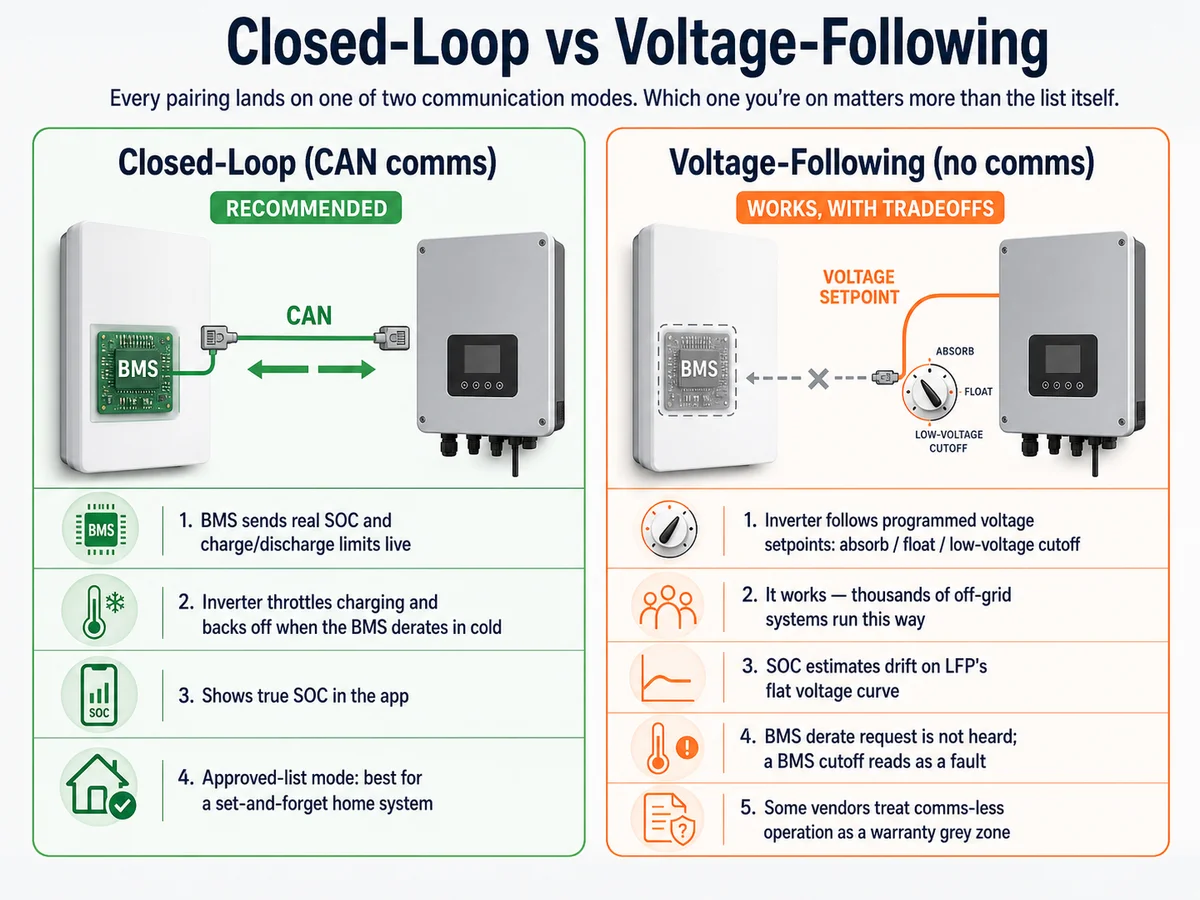
Chaque appariement – répertorié ou non – atterrit sur l’un des deux modes de communication. Savoir sur lequel vous vous trouvez compte plus que la liste elle-même.
Boucle fermée (CAN comms) : le BMS de la batterie indique en direct à l’onduleur son état de charge réel et ses limites de charge/décharge. L’onduleur ralentit la charge lorsque la batterie le demande, recule par temps froid lorsque le BMS se dégrade et affiche le véritable SOC dans l’application. Il s’agit du mode certifié par la liste approuvée et du mode que vous souhaitez pour un système domestique à installer et à oublier.
Suivi de la tension (pas de communication) : l’onduleur ignore le BMS et fonctionne uniquement selon les points de consigne de tension que vous programmez : tension d’absorption, tension flottante, coupure basse tension. Cela fonctionne et des milliers de systèmes hors réseau fonctionnent de cette façon. Mais le SOC estime la dérive sur la courbe de tension plate du LFP, l’onduleur n’entendra pas de demande de déclassement du BMS (le BMS se coupe simplement, ce qui se lit comme un défaut), et certains fournisseurs traitent le fonctionnement sans communication comme une zone grise de garantie.
Puis-je utiliser une batterie qui ne figure pas sur la liste approuvée de Deye ?
Sur un hybride BT 48V : généralement oui, de deux manières. Tout d’abord, vérifiez si le BMS de la batterie parle un protocole CAN reconnu par Deye : de nombreux packs LFP 48 V implémentent l’un des protocoles lithium courants sélectionnables dans le menu de la batterie Deye, ce qui vous permet d’obtenir un comportement en boucle fermée sans être nommé sur le PDF. Deuxièmement, si aucun protocole ne correspond, exécutez le mode de suivi de tension avec les points de consigne recommandés par le fournisseur de batterie. Ce que vous ne devriez pas faire, c’est forcer un mauvais numéro de protocole juste pour effacer le défaut de communication – une batterie signalant via un protocole incompatible peut alimenter l’onduleur avec des limites de courant erronées, ce qui est pire que pas de communication du tout.
Le routeur d’appariement Deye
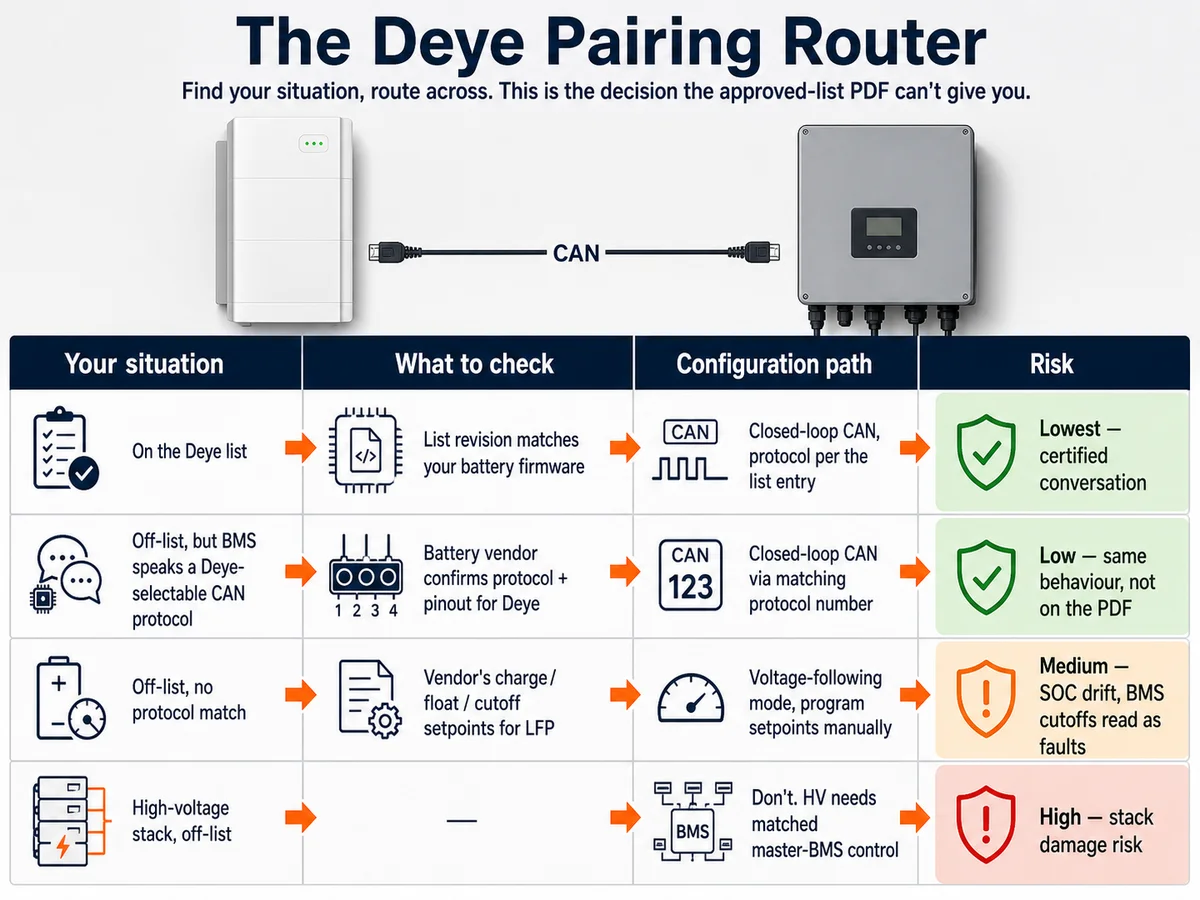
Trouvez votre situation dans la colonne de gauche et traversez-la. C’est la décision que le PDF de la liste approuvée ne peut pas vous donner.
| Votre situation | Que vérifier | Chemin de configuration | Niveau de risque |
|---|---|---|---|
| La batterie est sur la liste Deye | La révision de la liste correspond au micrologiciel de votre batterie | CAN en boucle fermée, protocole selon l’entrée de la liste | Le plus bas – conversation certifiée |
| Hors liste, mais BMS parle un protocole CAN sélectionnable par Deye | Le fournisseur de batterie confirme le protocole + brochage pour Deye | CAN en boucle fermée via un numéro de protocole correspondant | Faible — même comportement, pas sur le PDF |
| Hors liste, aucune correspondance de protocole | Points de consigne de charge/flottant/coupure du fournisseur pour LFP | Mode de suivi de tension, programmer les points de consigne manuellement | Moyen – Dérive du SOC, coupures strictes du BMS lues comme des défauts |
| Pile haute tension, hors liste | — | Ne le faites pas. La HT a besoin d’un contrôle maître-BMS adapté | Élevé : risque de dommages à la pile |
Pour connaître la logique générale de l’association de n’importe quelle batterie 48 V à n’importe quel onduleur hybride (Deye inclus), l’élément complémentaire est notre guide d’appariement de l’onduleur hybride et de la batterie ; pour une image complète marque par marque au-delà de Deye, consultez notre guide de compatibilité Victron et la matrice de compatibilité onduleur-batterie.
Obtenir la bonne couche physique : câblage et paramètres CAN
La plupart des plaintes de « batterie incompatible » que nous recevons concernent en fait des problèmes de couche un : le câble, pas le protocole. Trois vérifications avant de conclure un appariement ne fonctionnent pas :
- Brochage. Les hybrides Deye LV transportent généralement CAN-H/CAN-L sur le port de communication de la batterie RJ45 (généralement les broches 4/5 — confirmez dans le manuel de votre modèle). Les fournisseurs de batteries ne câblent pas tous leurs ports de communication de la même manière ; un câble Ethernet direct entre des brochages incompatibles est la panne silencieuse la plus courante.
- Sélection du protocole. Dans le menu de la batterie Deye, le mode lithium ainsi que le numéro de protocole correct pour la marque de votre batterie. Mauvais numéro = erreur de communication ou, pire encore, données erronées apparemment plausibles.
- Fenêtre de tension. Un pack LFP de 51,2 V fonctionne entre 40 et 58 V sur sa courbe de charge ; confirmez que les paramètres de tension de la batterie de l’onduleur correspondent à la fiche technique du pack, et non aux valeurs par défaut du plomb-acide. Pour savoir où se situent ces tensions tout au long du cycle de charge, consultez le tableau de tension LiFePO4 48 V.
📐 Depuis le banc : lorsque les installateurs associant notre plate-forme LFP 48 V avec des hybrides Deye LV signalent un défaut de communication, la solution dans la plupart des cas est le brochage du câble ou le numéro de protocole — et non une réelle incompatibilité. Les packs prennent en charge la communication CAN en boucle fermée avec les modèles Deye LV ; la conversation doit simplement être câblée et sélectionnée correctement. Nous confirmons le paramètre exact du protocole par modèle d’onduleur plutôt que de demander aux acheteurs d’essayer et d’erreurr le menu.
Imaginez la décision : le pack hors liste qui “n’a pas fonctionné”
Imaginez un installateur mettant en service un système 48 V sur un hybride de la famille Deye avec une batterie qui ne figure pas sur la liste approuvée. Premier démarrage : défaut de communication, icône batterie clignotante. La réponse du forum serait « la batterie n’est pas sur la liste, achetez-en une » – une conclusion de 3 000 $. La séquence réelle qui l’a résolu : vérifiez le protocole CAN documenté du fournisseur de batterie pour Deye (il en avait un), reconnectez le câble de communication au brochage correct, sélectionnez le numéro de protocole correspondant, redémarrez. Une boucle fermée est apparue, un SOC en direct dans l’application, les limites de charge ont été respectées. Coût total : un connecteur RJ45. La liste approuvée n’a jamais été un obstacle – le schéma de câblage l’a été. C’est le piège de la liste approuvée sur le terrain : le PDF est blâmé pour ce qu’un brochage a fait.
Où Savolture se situe-t-il sur cette liste
Les packs Savolture n’apparaissent pas sous notre propre nom sur le PDF de Deye – cela vaut la peine de le préciser clairement. Les modules Savolture 51,2 V LiFePO4 (5,12 kWh, 10,24 kWh et 16,08 kWh) communiquent via CAN 2.0B à 500 kbps et RS485 Modbus RTU, la même couche physique que les onduleurs hybrides Deye LV utilisent pour la boucle fermée. contrôle. Les packs parallèles peuvent contenir jusqu’à 16 unités, sont classés 6 500 à 8 500 cycles à 80 % de DoD selon le modèle, bénéficient d’une garantie de 10 à 15 ans indiquée par modèle et sont livrés avec les documents de transport UN 38.3.
Hors liste n’est pas la même chose qu’incompatible – comme le montre le routeur ci-dessus, c’est la poignée de main du protocole qui décide du résultat, pas du PDF. Cela signifie que vous devez demander une confirmation écrite d’appariement par rapport à votre modèle Deye exact avant de commander. Envoyez le modèle d’onduleur avec votre demande et nous confirmerons le protocole et les paramètres par écrit.
Erreurs courantes avec le couplage de la batterie Deye
- Traitement de la liste approuvée comme une liste blanche. Il certifie les appariements testés en boucle fermée ; cela n’interdit pas tout le reste. Acheminez plutôt via le routeur de couplage.
- Forcer un mauvais numéro de protocole pour effacer un défaut. Des données de protocole incompatibles sont pires que l’absence de communication : l’onduleur peut obéir à des limites de courant qui ne sont pas réelles.
- En supposant qu’un câble de raccordement Ethernet est un câble de communication. Les brochages diffèrent selon les fournisseurs de batteries et d’onduleurs. Vérifiez les positions CAN-H/CAN-L aux deux extrémités.
- Suivi de la tension de fonctionnement avec les valeurs par défaut du plomb. Les points de consigne du LFP sont différents ; de mauvaises tensions d’absorption/de maintien sous-chargent ou surchargent chroniquement le pack. Et dans les climats froids, n’oubliez pas que le BMS bloquera la charge en dessous de 0 °C, quels que soient les souhaits de l’onduleur – voir les Fenêtres de température de fonctionnement du LiFePO4.
- Application de la logique BT à une pile HT. Le couplage hors liste est un chemin gérable sur les systèmes 48 V uniquement. Les piles haute tension ont besoin du couplage BMS correspondant et répertorié – point final.
Ce qui change en 2026
La boucle fermée devient l’attente par défaut plutôt qu’une fonctionnalité premium. Deux conséquences de cette décision : premièrement, les révisions de la liste de Deye ne cessent de s’allonger : une batterie absente du PDF de l’année dernière peut se trouver dans le PDF actuel, alors extrayez toujours la dernière révision de la page de téléchargement officielle de Deye avant d’exclure quoi que ce soit. Deuxièmement, de plus en plus de fournisseurs de LFP 48 V proposent désormais un micrologiciel BMS multiprotocole qui parle plusieurs dialectes majeurs de l’onduleur, ce qui réduit discrètement la ligne « aucune correspondance de protocole » du routeur. Résultat pratique : le chemin hors liste mais en boucle fermée s’élargit chaque année et le suivi de tension se replie sur de véritables cas de pointe hérités et hors réseau.
Sources et lectures complémentaires
- Listes officielles des batteries approuvées par Deye — Documents DY-LV48 (basse tension) et DY-HV 160-800 (haute tension), via la section de téléchargement de deyeinverter.com ; utilisez toujours la dernière révision.
- Article 706 du NEC – Exigences d’installation du système de stockage d’énergie référencées pour les déploiements résidentiels aux États-Unis.
- Liste des batteries approuvées par le Clean Energy Council (CEC) : vérification équivalente en Australie pour les déploiements résidentiels conformes à la norme AS/NZS 5139 ; consultez notre guide de la liste des batteries approuvées par la CEC.
- UL 9540 / IEC 62619 — les normes de sécurité qui régissent la batterie elle-même, distinctes de toute liste de compatibilité de l’onduleur.
Confirmez ce couplage avant de commander
Être sur – ou hors – de la liste de Deye n’est que la première étape. Le fait que la boucle fermée fonctionne réellement dépend du protocole utilisé par votre modèle exact d’onduleur, et cela mérite d’être confirmé par écrit avant une commande d’achat. Envoyez-nous votre modèle Deye et nous vous renverrons le paramètre de protocole, le brochage et s’il fonctionne en boucle fermée ou en suivant la tension – pour cette unité spécifique.
Vous ne savez pas ce que tout cela signifie ? Notre explication sur ce que fait réellement un BMS explique pourquoi le protocole décide de tout, et la matrice de compatibilité en boucle fermée montre les plates-formes que nous avons confirmées.
Foire aux questions
Quelles batteries sont compatibles avec un onduleur Deye ?
Trois groupes : les batteries figurant sur la liste officielle approuvée de Deye (appariements testés en boucle fermée), les batteries 48 V dont le BMS parle un protocole CAN sélectionnable dans le menu de la batterie Deye (en boucle fermée sans figurer sur le PDF) et toute batterie de classe 48 V dans la fenêtre de tension CC de l’onduleur fonctionnant en mode de suivi de tension. Pour les modèles Deye haute tension, respectez strictement la liste homologuée HT.
Quelle est la différence entre les listes de batteries BT et HV de Deye ?
La liste BT (DY-LV48) couvre les batteries de classe 48 V pour les onduleurs hybrides basse tension de Deye ; la liste HT (DY-HV 160–800) couvre les piles en série haute tension. Ils sont séparés car les piles HT nécessitent un contrôle coordonné maître-BMS sur l’ensemble de la chaîne – c’est également pourquoi le couplage hors liste n’est qu’une option judicieuse sur les systèmes BT.
Deye utilise-t-il CAN ou RS485 pour la communication avec la batterie ?
CAN est le principal bus de communication de batterie sur les onduleurs hybrides Deye, avec RS485 pris en charge sur certains modèles. Le point de défaillance pratique n’est généralement pas le type de bus mais le brochage RJ45 : vérifiez quelles broches portent CAN-H et CAN-L à la fois sur l’onduleur et sur la batterie avant de supposer un problème de protocole.
Que se passe-t-il si la batterie et l’onduleur Deye ne peuvent pas communiquer ?
L’onduleur génère un défaut de communication et, non configuré, ne gère pas correctement la batterie. Vos options : corrigez la couche physique (câble/brochage), sélectionnez le numéro de protocole lithium correct si le BMS en prend en charge un, ou passez délibérément en mode de suivi de tension avec les points de consigne LFP du fournisseur de batterie. Ne laissez pas un système fonctionner avec un défaut de communication non résolu : cela signifie généralement que l’onduleur devine les limites de la batterie.
Une batterie qui ne figure pas sur la liste est-elle dangereuse avec un onduleur Deye ?
La liste ne mesure pas la sécurité – elle mesure la communication testée. La sécurité de la batterie dépend de ses propres certifications (UL 9540, CEI 62619) et d’une installation correcte. Une batterie hors liste avec une prise en charge appropriée du protocole CAN ou des points de consigne de suivi de tension correctement programmés peut fonctionner en toute sécurité ; une batterie répertoriée avec un câble de communication mal câblé peut toujours présenter un défaut. Jugez la sécurité par les certifications de la batterie et la qualité de la configuration, et non par l’adhésion au PDF.
Confirmez votre association avant d’acheter
Vous avez un modèle d’onduleur Deye en main et une liste restreinte de batteries, mais vous ne savez pas sur quel chemin d’appairage vous vous trouvez ? C’est exactement la question à laquelle nous répondons quotidiennement. Indiquez-nous votre numéro de modèle Deye et la capacité dont vous avez besoin, et nous vous confirmerons si notre plate-forme 200Ah, 100Ah ou 314Ah auto-chauffante s’associe en boucle fermée avec lui – y compris le paramètre exact du protocole et le brochage des communications, de sorte que le jour de la mise en service est une liste de contrôle, pas une expérience. Vous souhaitez plutôt associer une autre marque d’onduleur ? Commencez par le côté onduleur hybride 48 V et revenez en arrière.
Pour la raison sous-jacente pour laquelle le protocole est important, notre explicatif sur ce que fait un BMS couvre les deux tâches effectuées par chaque système de gestion de batterie – et pourquoi le travail de communication est celui qui décide de la compatibilité Deye.
{“@context”:”https://schema.org”,”@graph”:[{“@type”:”BlogPosting”,”@id”:”https://savolture.com/fr/blog/deye-battery-compatibility-list/#webpage”,”url”:”https://savolture.com/fr/blog/deye-battery-compatibility-list/”,”name”:”Liste de compatibilité des batteries Deye : ce que cela signifie réellement (et ce qui fonctionne hors liste)”,”description”:”Guide technique complet : Liste de compatibilité des batteries Deye : ce que cela signifie réellement (et ce qui fonctionne hors liste). Spécifications, protocoles et conseils d’ingénierie pour professionnels du solaire.”,”inLanguage”:”fr”,”author”:{“@id”:”https://savolture.com/#organization”},”publisher”:{“@id”:”https://savolture.com/#organization”},”headline”:”Liste de compatibilité des batteries Deye : ce que cela signifie réellement (et ce qui fonctionne hors liste)”,”mainEntityOfPage”:”https://savolture.com/fr/blog/deye-battery-compatibility-list/”},{“@type”:”Organization”,”@id”:”https://savolture.com/#organization”,”name”:”Savolture”,”url”:”https://savolture.com/”,”inLanguage”:”fr”}]}
Ready to size your system?
Get a free battery recommendation.
Tell us your load, location, and backup target — we will spec the right 48V LiFePO4 system for you.