

Savolture Technical Guide
Compatibilité des batteries Victron (2026) : les trois niveaux et le test DVCC | Savolture
Il y a un conseil qui circule sur les pages de Victron et qui coûte de l'argent réel aux installateurs : si une batterie ne figure pas sur la liste testée de Victron, elle ne pe...
body.sv-lang-fr { line-height: 1.55; }
.svba-direct-answer{background:#f0f4f8;border-left:5px solid #ff6b35;padding:16px 20px;margin:20px 0;border-radius:4px;font-size:15.5px;line-height:1.65}
.svba-checklist-box{background:#fff8f3;border:1px solid #ffd9c2;border-radius:6px;padding:16px 20px;margin:20px 0}
.svba-checklist-box strong{color:#c2410c}
table.svba-ref{width:100%;border-collapse:collapse;margin:20px 0;font-size:14.5px}
table.svba-ref th,table.svba-ref td{border:1px solid #d4d8de;padding:10px 12px;text-align:left;vertical-align:top}
table.svba-ref th{background:#081827;color:#fff;font-weight:600}
table.svba-ref tr:nth-child(even){background:#f7f9f8}
table.svba-ref td.navy{background:#081827;color:#fff;font-weight:600;text-align:center}
table.svba-ref td.code{font-family:ui-monospace,Menlo,Consolas,monospace;font-weight:700;color:#c2410c;text-align:center}
table.svba-ref td.win{background:#f0f7f2;font-weight:600;color:#1a6b3a}
.svba-protip{background:#081827;color:#eef2f6 !important;padding:16px 20px;border-radius:6px;margin:20px 0;font-size:14.5px}
.svba-protip strong{color:#ff9a6b !important}
.svba-protip em{color:#eef2f6 !important}
.svba-warn{background:#fef2f2;border:1px solid #fecaca;border-left:5px solid #dc2626;padding:16px 20px;margin:20px 0;border-radius:4px;font-size:14.5px}
.svba-warn strong{color:#b91c1c}
.svba-mistakes{border:1px solid #e2e6ea;border-radius:6px;padding:6px 18px;margin:14px 0;background:#fafbfc}
.svba-mistakes h4{margin:14px 0 6px;font-size:16px;color:#081827}
.svba-mistakes .wrong{color:#b91c1c;font-weight:700}
.svba-mistakes .right{color:#1a6b3a;font-weight:700}
.svba-srcnote{font-size:12.5px;color:#777;font-style:italic;margin:-12px 0 18px}
.svba-cta-grid{display:grid;grid-template-columns:repeat(auto-fit,minmax(240px,1fr));gap:14px;margin:24px 0}
.svba-cta-card{background:#1a4d33;color:#fff;padding:18px;border-radius:6px;text-align:center}
.svba-cta-card a{color:#fff;text-decoration:none;font-weight:600;display:block}
.svba-cta-card small{display:block;margin-top:6px;font-weight:400;opacity:.85;font-size:13px}
.svba-faq h3{margin-top:22px;font-size:17px;color:#1a4d33}
.svba-sources{font-size:13.5px;color:#555;background:#fafafa;padding:14px 18px;border-radius:4px;margin-top:30px}
.svba-about{border:1px solid #e2e6ea;border-radius:8px;padding:4px 22px 18px;margin:34px 0 10px;background:#fbfcfd}
.svba-about h2{margin-bottom:4px}
.svba-profile{background:#081827;color:#eef2f6 !important;border-radius:6px;padding:16px 20px;margin:14px 0;font-size:14px;line-height:1.7}
.svba-profile strong{color:#ff9a6b !important}
Il y a un conseil qui circule sur les pages de Victron et qui coûte de l’argent réel aux installateurs : si une batterie ne figure pas sur la liste testée de Victron, elle ne peut pas communiquer avec le système, vous devriez donc vous rabattre sur un shunt et la surveiller comme un pack stupide. Ce n’est pas ce que dit Victron. La page de compatibilité des batteries de Victron indique clairement que de nombreuses batteries tierces ne figurant pas sur la liste sont compatibles, que leur utilisation est autorisée sous garantie et que Victron fournit ses spécifications de protocole de batterie à ces fabricants sur demande. Hors liste et hors communication sont deux choses différentes. Ce guide classe la compatibilité des batteries Victron selon les trois niveaux qui existent réellement et explique le comportement du BMS qui décide si une batterie parle proprement ou déclenche des alarmes fantômes pendant une semaine.
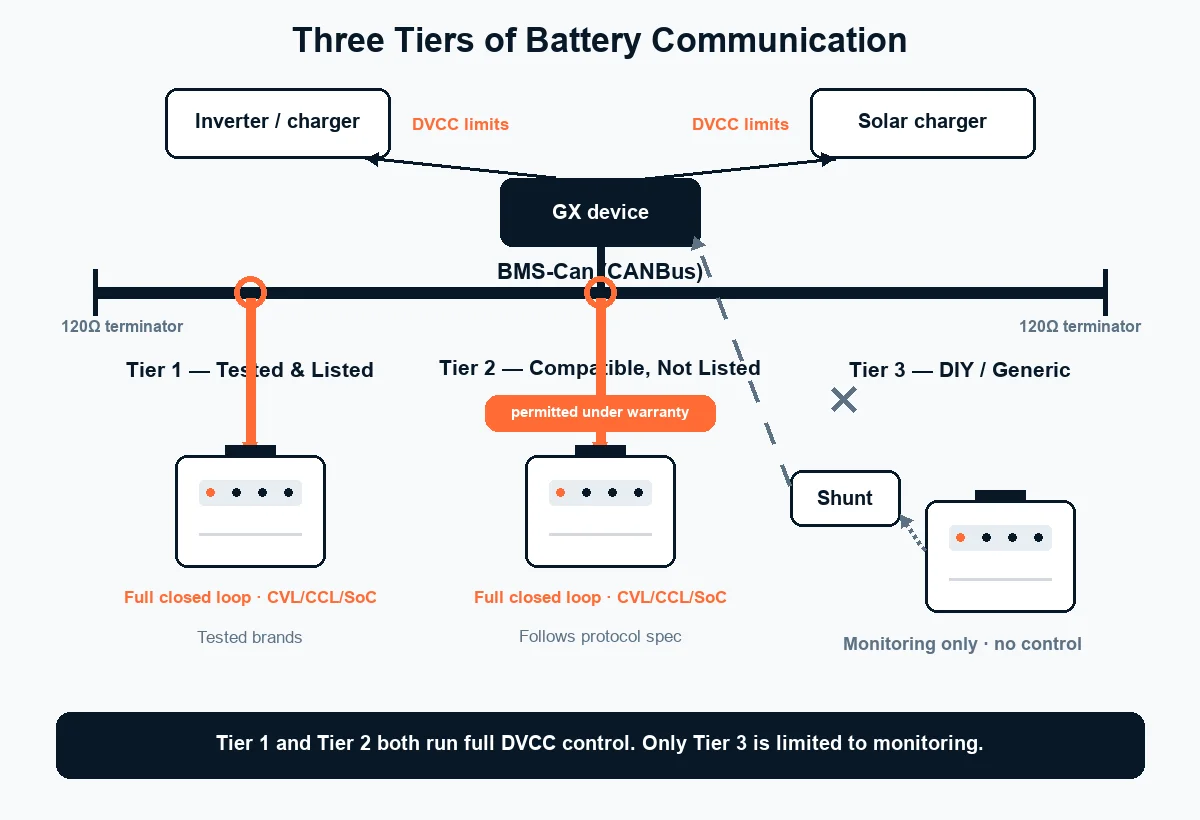
Réponse rapide : Victron gère un écosystème de batteries ouvert avec trois niveaux de compatibilité. Le Tier 1 regroupe les quelque 28 marques que Victron a testées et documentées (Pylontech, BYD B-Box, Dyness, Pytes, BSLBATT, Discover AES, BattleBorn, SimpliPhi, Freedom Won, Sunwoda et autres), offrant un fonctionnement géré plug-and-play. Le niveau 2 concerne les batteries tierces qui ne figurent pas sur cette liste : Victron confirme qu’elles sont compatibles, autorisées sous garantie et prises en charge par votre fournisseur, et qu’elles exécutent le même contrôle complet en boucle fermée que le niveau 1 à condition que le BMS suive le protocole de Victron. Le Tier 3 concerne les configurations BMS DIY et auto-construites (123SmartBMS, Batrium, REC), que Victron ne prend en charge que de manière limitée. Les batteries gérées se connectent via BMS-Can (CANBus) à un appareil GX tel que le Cerbo GX, qui exécute ensuite DVCC. Le test le plus utile pour savoir si une batterie est véritablement gérée : lorsque le pack se remplit, son BMS doit réduire la Limite de tension de charge (CVL). Un BMS qui limite uniquement la limite de courant de charge (CCL) déclenchera des avertissements de surtension et de surcharge qui ressemblent à des défauts de l’onduleur mais n’en sont pas.
Compatibilité des batteries Victron : les trois niveaux
Victron ne publie pas une seule liste approuvée ou rejetée. Il publie une liste testée puis, séparément, une politique pour tout le reste, et c’est dans l’écart entre ces deux documents que réside l’essentiel de la confusion sur ce sujet. Bien triés, il existe trois niveaux, et seul le troisième est véritablement limité.
| Niveau | Qu’est-ce que c’est | Qui est dedans | Communication et contrôle |
|---|---|---|---|
| Niveau 1 Testé et répertorié |
Victron a testé la batterie et publié la documentation d’intégration correspondante | Pylontech, BYD B-Box, Dyness, Pytes, BSLBATT, Discover AES, BattleBorn, SimpliPhi, Freedom Won, Hubble, MG Energy, Rolls LFP, SolarMD, Soluna, Sunwoda, WeCo, ZYC Energy et autres (~ 28) | Boucle fermée entièrement gérée sur BMS-Can ; Contrôle DVCC ; configuration documentée |
| Niveau 2 Compatible, Non répertorié |
Batterie gérée par un tiers suivant les spécifications du protocole de Victron. Victron : compatible, autorisé sous garantie, pris en charge via votre fournisseur | Packs LFP tiers de qualité avec un CAN BMS conçu pour les plates-formes ouvertes. C’est là que se trouve notre LFP 48 V | Boucle fermée entièrement gérée sur BMS-Can ; Contrôle DVCC ; les paramètres de configuration proviennent du fournisseur |
| Niveau 3 Bricolage / Auto-construction |
Produits BMS séparés vendus pour les banques de lithium auto-construites | 123SmartBMS, Batrium, Boostech, REC BMS, connu pour suivre les spécifications Victron mais non testé par Victron | Varie. Victron déclare offrir un support très limité pour ces systèmes. |
Structure de niveaux dérivée de la page officielle de compatibilité des batteries de Victron Energy (victronenergy.com/live, dernière modification le 16 mars 2026), qui répertorie les batteries testées, indique la garantie et la position d’assistance pour les batteries tierces non répertoriées et documente séparément les produits BMS de bricolage/auto-construction. La couverture de la marque change entre les révisions. Consultez la page actuelle pour votre modèle spécifique.
Ce qu’il faut retenir en pratique, c’est la frontière entre le niveau 2 et le niveau 3, et non entre le niveau 1 et le niveau 2. Une batterie de niveau 2 n’est pas une version de compromis d’une batterie de niveau 1. Il fonctionne sur la même boucle fermée, signale le même état de charge et accepte le même contrôle DVCC. Ce que vous abandonnez en étant hors de la liste testée, c’est la propre documentation de Victron et le propre service d’assistance de Victron pour ce pack spécifique, c’est précisément pourquoi le libellé de Victron met la responsabilité sur le fournisseur. Si votre fournisseur ne peut pas vous fournir les paramètres d’appariement, il s’agit d’un problème de fournisseur et non d’un problème de protocole.
Le test DVCC/CVL : ce que signifie réellement « géré »
Une batterie gérée est une batterie dont le BMS indique au système Victron quoi faire, et non une batterie qui se contente de rapporter des chiffres. La batterie publie quatre valeurs sur BMS-Can : limite de tension de charge, limite de courant de charge, limite de courant de décharge et état de charge – et l’appareil GX les utilise pour piloter l’ensemble du système à travers DVCC (Contrôle distribué de tension et de courant). C’est la différence entre une batterie surveillée et une batterie en charge.
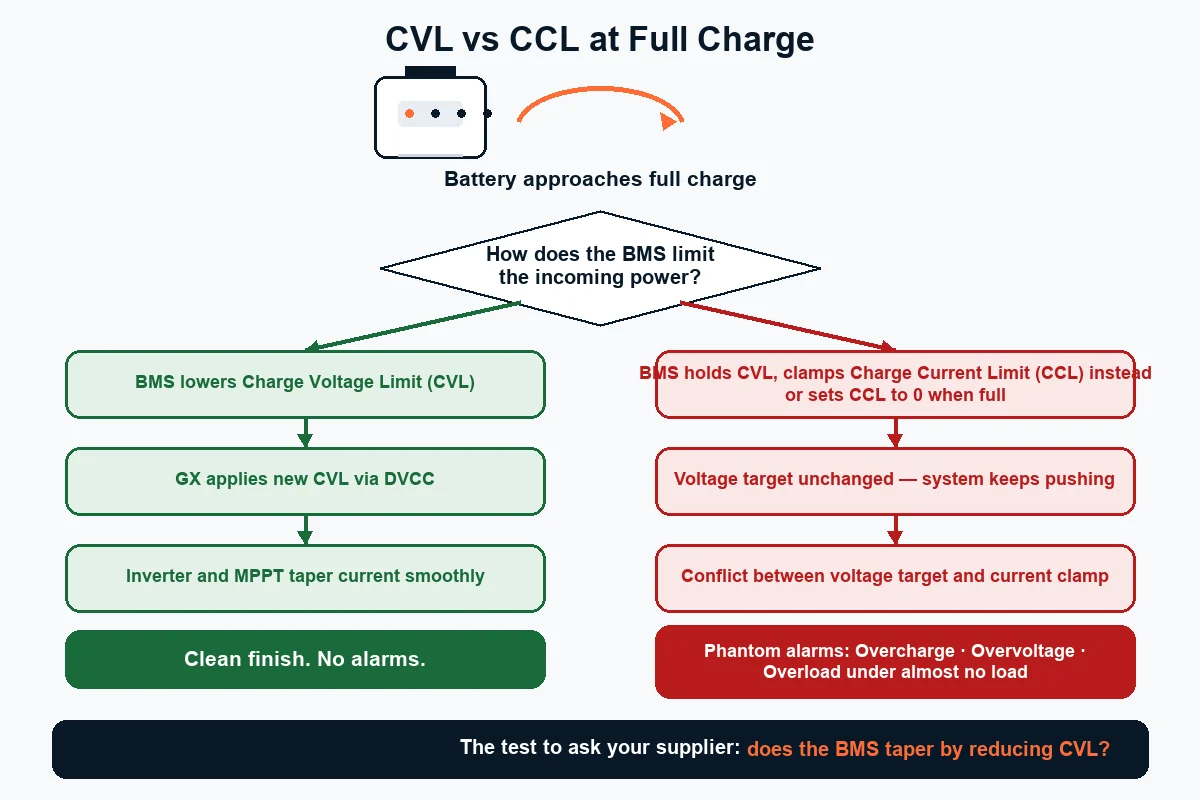
C’est là qu’existe un véritable test vérifiable. La documentation de compatibilité de Victron signale un modèle de défaillance spécifique qu’elle voit à plusieurs reprises dans les conceptions BMS tierces et DIY, et cela vaut la peine de citer le mécanisme avec précision, car il explique une classe de défauts qui est diagnostiquée à tort comme un problème d’onduleur :
La panne associée est un BMS qui bloque complètement le courant de charge ou de décharge, ou met le CCL à zéro lorsque le pack est plein. Victron rapporte que cela déclenche des alarmes déroutantes, notamment l’onduleur/chargeur signalant des conditions de surcharge presque sans charge. Les installateurs passent ensuite des heures à rechercher un défaut qui n’existe pas, découvrent que l’onduleur fonctionne parfaitement sur le banc et découvrent seulement plus tard que la cause était la logique BMS de la batterie.
Ainsi, lorsque vous évaluez une batterie pour un système Victron, la question à poser au fournisseur n’est pas « est-elle compatible ? – tout le monde dit oui. La question est la suivante : le BMS diminue-t-il en réduisant le CVL à mesure que le pack s’approche de sa pleine, et évite-t-il de remettre le CCL à zéro à 100 % ? Un fournisseur qui comprend la question est un fournisseur dont la batterie sera mise en service proprement. Celui qui ne comprend pas vous dit quelque chose d’utile.
- Niveau : la batterie est-elle testée (niveau 1), hors liste mais conforme au protocole (niveau 2) ou un BMS DIY (niveau 3) ? Les niveaux 1 et 2 vous offrent tous deux une boucle fermée complète.
- Bus : se connecte-t-il via BMS-Can à un appareil GX, avec le brochage et la terminaison du câble corrects aux deux extrémités du bus CAN ?
- Comportement CVL : le BMS diminue-t-il via la limite de tension de charge plutôt que par le courant de serrage uniquement ? Demandez par écrit le comportement en matière de limite de charge.
- Sécurité : le pack inclut-il son propre débranchement physique (contacteur ou équivalent) ? Victron est explicite : il ne suffit pas de se fier uniquement aux signaux numériques pour arrêter la recharge.
Nous confirmerons les paramètres d’appairage BMS-Can et le comportement conique CVL avant de passer commande.
« Pas sur la liste » ne signifie pas « Aucune communication »
Victron autorise explicitement les batteries tierces qui ne figurent pas sur sa liste testée, sous garantie, et fournit ses spécifications de protocole de batterie à ces fabricants sur demande. Il s’agit du fait le plus erroné concernant la compatibilité Victron, et une erreur conduit les gens à acheter le mauvais produit ou à paralyser une batterie parfaitement performante.
Vous trouverez des guides – dont un actuellement classé en tête de cette recherche – qui décrivent les batteries non répertoriées comme fonctionnant « sans communication directe avec les onduleurs Victron », puis recommandent un SmartShunt comme solution de contournement. Pour une batterie véritablement non gérée, ce conseil est bon : un shunt est exactement le bon outil pour un pack sans communication. Appliqué comme règle générale à toutes les batteries hors liste, c’est faux et cela rétrograde discrètement une batterie de niveau 2 en une installation de niveau 3.
La différence est importante car le contrôle en boucle fermée n’est pas une fonctionnalité de luxe. Sans cela, vous perdez les limites de charge tenant compte de la température, le contrôle du courant piloté par le BMS et un véritable état de charge provenant du propre comptage coulomb de la batterie plutôt que d’une estimation déduite. Sur un système hors réseau où le chiffre « % restant » décide si le générateur démarre, il s’agit d’un déclassement significatif.
“Aucune communication” sur Victron : comment le trier
La plupart des défauts « absence de communication » sur un système Victron sont des problèmes de bus et de configuration, et non des problèmes de compatibilité. Examinez-les dans l’ordre avant de conclure que la batterie est incompatible. La faille se situe généralement en amont du pack.
- La batterie est-elle sur BMS-Can, pas le mauvais port CAN ? Un appareil GX possède plus d’une interface CAN et les services diffèrent entre eux. Le service de batterie gérée appartient à BMS-Can. Confirmez le port et confirmez que le profil du bus CAN est défini sur la vitesse attendue par la batterie (500 kbit/s est typique pour les profils LFP BMS ; consultez la documentation de la batterie pour la valeur exacte).
- Le bus est-il terminé aux deux extrémités ? CAN a besoin d’une terminaison à chaque extrémité physique du bus. Un terminateur manquant produit exactement le symptôme signalé par les gens : “il a fonctionné pendant une minute puis est tombé” : une panne de communication intermittente et dépendante de la charge qui ressemble à un bug du micrologiciel.
- Le brochage du câble est-il correct ? Les connecteurs RJ45 sont le piège standard ici. Un câble CAN de marque de batterie et un câble de raccordement Ethernet générique semblent identiques et ne sont pas identiques sur le plan électrique. Les brochages diffèrent selon les marques de batteries ; utiliser le mauvais câble vous donne une lumière de liaison et aucune donnée.
- Le DVCC est-il activé et la batterie est-elle sélectionnée comme moniteur de contrôle ? Avec le DVCC désactivé, le GX n’agira pas sur les limites de la batterie même s’il peut les voir. Vérifiez que la batterie est définie comme moniteur de batterie du système plutôt que comme shunt qui prend silencieusement la priorité.
- Le micrologiciel GX est-il à jour ? Victron ajoute et affine la prise en charge du pilote de batterie dans les versions du système d’exploitation Venus. Un firmware plus ancien peut tout simplement ne pas contenir le pilote d’un pack plus récent.
- Seulement alors : est-ce la logique du BMS ? Si les communications sont établies mais que vous voyez des alarmes de surtension ou de surcharge fantôme, vous observez probablement le comportement CVL-versus-CCL décrit ci-dessus plutôt qu’un défaut de câblage.
Les étapes 2 et 3 représentent à elles deux la grande majorité de ces appels. Ce n’est presque jamais l’onduleur.
Quels produits Victron acceptent une batterie gérée
L’intégration gérée de la batterie sur Victron s’effectue via un appareil GX, et non via l’onduleur directement. L’onduleur/chargeur effectue la conversion de puissance ; le dispositif GX est ce qui communique le BMS-Can à la batterie et distribue le contrôle à tout le reste du système.
| Composant | Exemples | Rôle dans un système de batterie gérée |
|---|---|---|
| Onduleur / chargeur | MultiPlus, MultiPlus-II, Quattro | Conversion de puissance. Reçoit les limites de charge et de décharge du GX ; ne parle pas au BMS de la batterie lui-même |
| Appareil GX | Produits Cerbo GX, Ekrano GX et intégrés à GX | Le hub. Exécute Venus OS, parle BMS-Can à la batterie, applique DVCC à travers le système |
| Chargeur solaire | SmartSolar / BlueSolar MPPT | Reçoit les limites de charge dérivées du DVCC afin que la charge photovoltaïque respecte le BMS, et pas seulement ses propres points de consigne. |
| Shunt de surveillance | SmartShunt, série BMV | SoC compté par Coulomb pour les batteries sans communications. Non nécessaire pour un pack géré et ne doit pas être laissé comme source SoC du système si une batterie gérée est présente |
L’implication en matière de conception est simple : si le contrôle en boucle fermée est important pour vous, prévoyez dès le départ un appareil GX. Un MultiPlus et une batterie gérée sans GX entre les deux sont un système qui ne peut pas exécuter DVCC, quelle que soit la qualité du BMS de la batterie.
Mise à l’échelle : batteries parallèles et limites de température
Lorsque vous empilez plusieurs modules de batterie, l’appareil GX devrait toujours voir une batterie, et non plusieurs. C’est la question qui se pose dès qu’un système dépasse un seul module, et cela change ce que vous devez demander au fournisseur.
Les modules LFP montés en rack sont généralement câblés en parallèle pour l’alimentation, puis connectés en série sur une liaison de communication interne distincte, avec un module configuré comme maître. Le maître regroupe les valeurs du pack et présente un ensemble unique de limites et un état de charge unique à l’appareil GX via BMS-Can. Du point de vue de Venus OS, il existe une batterie avec une plus grande capacité, ce que vous souhaitez : plusieurs packs publiant chacun leur propre limite de tension de charge concurrente sur le même bus sont un problème de configuration, pas une fonctionnalité.
En pratique, cela signifie que le nombre de modules que vous pouvez exécuter dans une banque est une propriété du BMS de la batterie, et non du système Victron. Demandez au fournisseur le nombre de parallèles maximum pris en charge et la méthode d’adressage avant de dimensionner la banque, car la mise à niveau d’un module dans une chaîne qui a atteint sa limite est une découverte coûteuse. Il convient également de confirmer que les modules doivent être du même modèle et idéalement du même âge ; C’est en mélangeant les capacités ou les générations dans une même chaîne que commencent les problèmes d’équilibre.
Ce que l’compatibilité par modèle de Victron vous offre
Il convient de mentionner ici la différence stratégique, car c’est la raison pour laquelle Victron domine le secteur hors réseau et marin de ce marché. La position de Victron est que les spécifications du protocole de batterie sont disponibles sur demande pour les fabricants, que les batteries tierces non répertoriées sont autorisées sous garantie et que la liste testée est une commodité plutôt qu’une porte d’accès. Comparez cela avec le secteur fermé du marché, où un onduleur n’accepte que les packs propres au fabricant et où les batteries tierces sont verrouillées de par leur conception, le compromis que nous avons présenté dans notre guide sur la Compatibilité des batteries Sungrow.
Une plateforme ouverte vous coûte quelque chose. Vous assumez le travail d’intégration, vous avez besoin d’un fournisseur capable de produire les paramètres d’appariement et vous assumez davantage de responsabilité dans la vérification du pack. Ce que vous obtenez en retour, c’est un effet de levier : vous pouvez spécifier la batterie en termes de capacité, de garantie, de durée de vie et de prix plutôt que d’accepter tout ce que vend la marque de l’onduleur. Au cours de la durée de vie d’un système, c’est généralement le nombre le plus élevé. La même logique de plate-forme ouverte pilote les autres systèmes de ce cluster : Growatt, GoodWe et Deye – et si vous êtes encore en train de choisir entre les architectures, commencez par les batteries domestiques basse tension ou haute tension.
Erreurs courantes liées à la compatibilité des batteries Victron
1. Traiter « pas sur la liste testée » comme « non compatible »
Faux : en supposant qu’une batterie doit apparaître sur la page testée de Victron pour fonctionner en boucle fermée. Droit : Victron autorise les batteries tierces non répertoriées sous garantie et partage ses spécifications de protocole avec les fabricants. Demandez au fournisseur les paramètres d’appairage au lieu d’exclure la batterie.
2. Acheter une batterie gérée et aucun appareil GX
Faux : coupler une batterie équipée de CAN directement à un MultiPlus et s’attendre à une boucle fermée. C’est vrai : l’appareil GX est ce qui parle BMS-Can et exécute DVCC. Sans cela, vous disposez d’une batterie coûteuse fonctionnant en mode contrôlé en tension.
3. Laisser un shunt comme source SoC sur un système géré
Faux : installer un SmartShunt à côté d’une batterie gérée et le laisser rester le moniteur de batterie du système. Droit : sur un pack géré, le BMS est la source SoC faisant autorité. Deux moniteurs concurrents produisent deux nombres différents et beaucoup de confusion.
4. Ignorer la façon dont le BMS diminue à pleine charge
Faux : en supposant que tout CAN BMS se comportera. Droite : demandez si cela réduit le CVL presque plein ou bloque le CCL. C’est le problème le plus souvent rencontré par les installateurs de pièges que nous fournissons : le pack parle, le GX le voit, puis le MultiPlus commence à signaler une surtension ou une surcharge alors que presque rien ne fonctionne. Nous signalons le comportement conique du CVL avant que quiconque ne commande, car il est beaucoup moins coûteux de répondre à un devis que de diagnostiquer le jour de la mise en service.
5. Ignorer la terminaison du bus CAN
Faux : faire fonctionner un seul terminateur, ou aucun, sur un court trajet de câble car “cela ne fait qu’un mètre”. Droite : termine les deux extrémités physiques. Les séries courtes échouent tout aussi facilement et le symptôme est intermittent plutôt qu’évident.
6. S’appuyer uniquement sur les signaux numériques pour la sécurité
Faux : croire qu’un message BMS indiquant au chargeur de s’arrêter constitue une protection suffisante. Droite : Victron déclare que la batterie doit être intrinsèquement sûre et inclure son propre grand mécanisme de déconnexion, tel qu’un contacteur. Spécifiez un pack capable d’ouvrir physiquement son propre circuit.
Confirmez ce couplage avant de commander
Être sur ou hors de la liste de Victron n’est que la première étape. Le fait que la boucle fermée fonctionne réellement dépend du protocole utilisé par votre modèle exact d’onduleur, et cela mérite d’être confirmé par écrit avant une commande d’achat. Envoyez-nous votre modèle Victron et nous vous renverrons le paramètre de protocole, le brochage et s’il fonctionne en boucle fermée ou en suivant la tension – pour cette unité spécifique.
Vous ne savez pas ce que tout cela signifie ? Notre explication sur ce que fait réellement un BMS explique pourquoi le protocole décide de tout, et la matrice de compatibilité en boucle fermée montre les plates-formes que nous avons confirmées.
Foire aux questions
Quelles batteries sont compatibles avec les onduleurs Victron ?
Victron publie une liste testée d’environ 28 marques de batteries, dont Pylontech, BYD B-Box, Dyness, Pytes, BSLBATT, Discover AES, BattleBorn, SimpliPhi, Freedom Won, Hubble, MG Energy, Rolls LFP, SolarMD, Soluna, Sunwoda, WeCo et ZYC Energy. Au-delà de cette liste, Victron déclare que de nombreuses batteries tierces supplémentaires sont compatibles, que leur utilisation est autorisée sous garantie et qu’elle fournit ses spécifications de protocole de batterie aux fabricants sur demande. Les batteries gérées se connectent via BMS-Can à un appareil GX tel qu’un Cerbo GX.
Puis-je utiliser une batterie tierce avec Victron qui ne figure pas sur la liste ?
Oui. La propre documentation de compatibilité de Victron indique que les batteries tierces non répertoriées sont compatibles, autorisées sous garantie et prises en charge par votre fournisseur local. À condition que le BMS implémente correctement le protocole de Victron, la batterie exécute le même contrôle DVCC complet en boucle fermée qu’une batterie testée. Ce que vous perdez, c’est la propre documentation de Victron pour ce pack spécifique, c’est pourquoi le fournisseur doit fournir les paramètres d’appariement.
Qu’est-ce que le DVCC sur un système Victron ?
DVCC signifie Contrôle distribué de tension et de courant. Lorsqu’une batterie gérée est connectée via BMS-Can, l’appareil GX lit la limite de tension de charge, la limite de courant de charge, la limite de courant de décharge et l’état de charge de la batterie, puis applique ces limites à l’onduleur/chargeur et aux chargeurs solaires. C’est ce qui fait du BMS de la batterie l’autorité sur l’ensemble du système plutôt qu’une simple source de lectures.
Pourquoi mon système Victron affiche-t-il des alarmes de surtension ou de surcharge avec une batterie au lithium ?
Il s’agit souvent de la logique de limitation de charge du BMS plutôt que d’un défaut. Victron exige que le BMS réduise la limite de tension de charge à mesure que le pack est presque plein. Si le BMS limite la limite de courant de charge sans ajuster le CVL, ou règle le CCL à zéro à pleine charge, le système peut signaler des avertissements de surcharge, de surtension ou de surintensité, y compris des conditions de surcharge presque sans charge. Vérifiez d’abord que le bus CAN est terminé aux deux extrémités et que le brochage est correct, puis examinez le comportement conique du BMS.
Ai-je besoin d’un Cerbo GX pour utiliser une batterie au lithium avec Victron ?
Vous avez besoin d’un appareil GX pour un fonctionnement en boucle fermée. L’onduleur/chargeur ne communique pas avec le BMS-Can à la batterie elle-même ; le périphérique GX le fait, puis distribue le contrôle via DVCC. Sans GX, une batterie gérée fonctionne en mode contrôlé en tension, qui fonctionne mais abandonne les limites de charge sensibles à la température, le contrôle du courant piloté par le BMS et le véritable état de charge signalé par le BMS.
Ai-je toujours besoin d’un SmartShunt avec une batterie gérée ?
Non. Un SmartShunt fournit un état de charge compté en coulomb pour les batteries sans communication, ce qui constitue la bonne solution pour les batteries au plomb ou les packs non gérés. Avec une batterie gérée, le BMS signale déjà un SoC faisant autorité sur BMS-Can. Laisser un shunt configuré comme moniteur de batterie système aux côtés d’un pack géré produit deux chiffres SoC concurrents.
Victron prend-il en charge les systèmes BMS de batterie DIY ?
Seulement de manière limitée. Victron nomme 123SmartBMS, Batrium, Boostech et REC BMS comme systèmes connus pour suivre ses spécifications de batterie, mais déclare qu’ils ne sont pas testés par Victron et qu’il offre une prise en charge très limitée pour les systèmes fonctionnant sur des batteries BMS personnalisées. Il documente également un modèle d’alarmes confuses provoquées par le comportement de limitation de charge du BMS DIY.
Combien de batteries puis-je faire fonctionner en parallèle sur un système Victron ?
Cette limite vient du BMS de la batterie, pas de Victron. Les modules de rack sont généralement mis en parallèle pour l’alimentation et connectés en série sur une liaison de communication interne, avec un module défini comme maître ; le maître présente ensuite un seul ensemble de limites agrégées et un état de charge au dispositif GX via BMS-Can. Demandez à votre fournisseur le nombre parallèle maximum pris en charge et la méthode d’adressage avant de dimensionner la banque, et conservez les modules selon le même modèle et un âge similaire pour éviter les problèmes d’équilibre.
Une batterie LFP 48 V est-elle le bon choix pour un système hors réseau Victron ?
Pour la plupart des systèmes hors réseau résidentiels et plus grands, oui. Une batterie LFP de 48 V (51,2 V nominal) déplace la même puissance à un quart du courant d’un système 12 V, ce qui réduit considérablement la taille et le coût des câbles, et 48 V est l’architecture standard pour les installations MultiPlus et Quattro de toute taille. Consultez notre tableau de tension LiFePO4 48 V pour connaître les points de consigne de charge et la référence de l’état de charge.
Modèle d’onduleur, appareil GX, version du firmware. Nous renvoyons les paramètres BMS-Can et le comportement du cône CVL par écrit.
Quelles plates-formes d’onduleurs sont ouvertes, lesquelles sont fermées et ce dont chacune a besoin.
Pourquoi nous avons écrit ceci
Recherchez « Compatibilité des batteries Victron » et vous obtenez la propre liste de Victron, quelques fils de discussion posant la même question anxieuse et une poignée de guides qui vous disent tranquillement qu’une batterie hors liste ne peut pas communiquer. Cette dernière affirmation contredit la propre documentation de Victron et pousse les gens soit à payer trop cher pour une marque répertoriée dont ils n’ont pas besoin, soit à paralyser un pack performant derrière un shunt. Nous produisons un stockage domestique et hors réseau LFP 48 V conçu pour les plates-formes d’onduleurs ouvertes. Le niveau 2 correspond donc exactement à l’endroit où se trouvent nos batteries : compatibles, respectant le protocole, ne figurant pas sur la liste testée, et dépendant donc de notre communication des paramètres d’appairage plutôt que de pointer vers la documentation de quelqu’un d’autre. C’est l’accord décrit dans la politique de Victron, et nous pensons qu’il est équitable. Nos packs sont produits dans une usine de batteries automatisée de 1,8 GWh conformément aux exigences UL 9540, UL 1973 et CEI 62619, avec CAN BMS conçu pour les architectures ouvertes. Les audits d’usine sont les bienvenus.
Pays : China | Modèle : B2B wholesale & distribution (LFP home storage)
Courriel : info@savolture.com | Internet : savolture.com
{“@context”:”https://schema.org”,”@graph”:[{“@type”:”BlogPosting”,”@id”:”https://savolture.com/fr/blog/victron-battery-compatibility-2026/#webpage”,”url”:”https://savolture.com/fr/blog/victron-battery-compatibility-2026/”,”name”:”Compatibilité des batteries Victron (2026) : les trois niveaux et le test DVCC”,”description”:”Guide technique complet : Compatibilité des batteries Victron (2026) : les trois niveaux et le test DVCC. Spécifications, protocoles et conseils d’ingénierie pour professionnels du solaire.”,”inLanguage”:”fr”,”author”:{“@id”:”https://savolture.com/#organization”},”publisher”:{“@id”:”https://savolture.com/#organization”},”headline”:”Compatibilité des batteries Victron (2026) : les trois niveaux et le test DVCC”,”mainEntityOfPage”:”https://savolture.com/fr/blog/victron-battery-compatibility-2026/”},{“@type”:”Organization”,”@id”:”https://savolture.com/#organization”,”name”:”Savolture”,”url”:”https://savolture.com/”,”inLanguage”:”fr”}]}
Ready to size your system?
Get a free battery recommendation.
Tell us your load, location, and backup target — we will spec the right 48V LiFePO4 system for you.